Best FACEIT extensions in 2026: Repeek, Forecast, Mappio, Lobby King and Prefire compared
The five FACEIT extensions worth knowing in 2026, compared on users, rating, price and features: auto accept, match room stats, win chance, map veto and smurf checks.
Free · Chrome, Opera, GX, Edge, Brave
FACEIT’s website shows names, levels and ELO. That’s about it. Extensions fill in the rest: who is on form, which map to ban, whether that level 4 is really a level 4. Here are the five worth knowing in 2026 and what each one is actually for.
All numbers below are from the Chrome Web Store on 10 November 2026.
The short version
| Extension | Users | Rating | Price | Best for |
|---|---|---|---|---|
| Repeek | 1,000,000 | 3.8 (395) | Free | Automation: accept, veto, connect |
| FACEIT Forecast | 200,000 | 4.7 (69) | Free, paid VIP badges | Deep player stats |
| FACEIT Mappio | 100,000 | 4.4 (36) | Free, paid Pro tier | Map picks and heatmaps |
| Lobby King | 40,000 | 4.9 (28) | Free | One map rating per lobby |
| Prefire | New (Oct 2026) | 5.0 (5) | Free, no paid tier | Everything in one place |
Feature by feature
| Repeek | Forecast | Mappio | Lobby King | Prefire | |
|---|---|---|---|---|---|
| Auto accept | Yes | Yes | Not listed | Not listed | Yes |
| Auto connect to server | Yes | Not listed | Not listed | Not listed | Yes |
| Player stats | Last 30 matches | Yes | Roles | Map rating | Yes |
| Win chance | Not listed | Not listed | Yes | Not listed | Yes |
| Map veto | Auto veto | Win rate per map | Veto prediction | Map rating | Win rate per map, ban hint |
| Smurf signals | Not listed | Not listed | Not listed | Not listed | Yes |
“Not listed” means the extension’s store page and website don’t mention the feature on that date. It may still exist.
Repeek (formerly FACEIT Enhancer)
The oldest and by far the biggest. It started in 2018 as FACEIT Enhancer and passed a million users. It’s an automation tool: it accepts matches and party invites, vetoes maps and server locations from your preferences, and connects you to the server. It also shows team ELO, how much ELO you’ll win or lose, and player stats from the last 30 matches.
It doesn’t list win chance, win rate per map or smurf checks. Some recent store reviews also report that auto accept misses matches, so check that it’s working before you rely on it.
Pick it if you want the match to set itself up and don’t need a scouting report.
FACEIT Forecast
The stats-heavy one. It adds each player’s exact level by ELO, form cards, win rate per map during the veto, a record of earlier encounters, ping and its own rating. It’s available in six languages and the developer answers reviews.
It’s free. It sells cosmetic VIP badges and shows a partner banner that you can switch off.
Pick it if you want the most numbers on screen and don’t mind a busier match room.
FACEIT Mappio
Built around the map. It shows roles, predicts the enemy captain’s veto and gives a win probability per map. Heatmaps sit behind a paid Pro tier.
Pick it if the veto is the part of the match you care about most.
Lobby King
The newest of the big four. It boils a lobby’s stats down to one rating per map, so you can read the veto at a glance. It has the highest rating of the group. It carries links to partner skin marketplaces.
Pick it if you want one number, not a dashboard.
Prefire
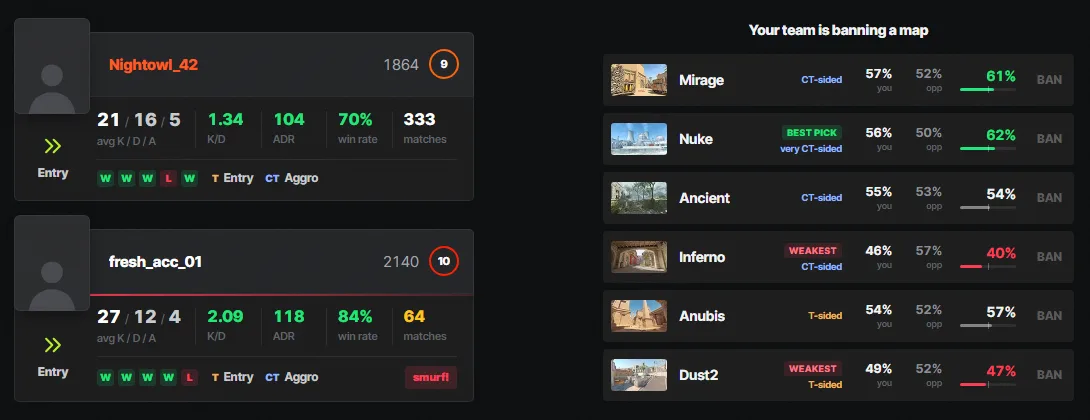
Prefire is the one we make, so read this part knowing that. It’s new and small. The idea is to cover the whole match in one free extension:
- Auto accept and auto connect, with a 5 second cancel countdown before it connects.
- Player stats on every card: K/D, ADR, win rate, role and the last 5 results.
- Win chance for both teams and the ELO at stake.
- Ban help inside FACEIT’s own veto list, with win rate per map for both teams.
- Smurf signals in two tiers, possible and likely, with the reasons on hover.
- Your history with and against every player in the room.
There’s no account, no paid tier and no ads. It sends only anonymous daily feature counts.
Pick it if you want stats, veto help and auto accept without stacking three extensions.
Can you run two at once?
Yes, but don’t let two extensions both auto accept. Turn it on in one and off in the other. Two sets of stats in the same match room also get crowded fast, so try one for a few matches before adding another.
How to install a FACEIT extension in Opera or Opera GX
Opera and Opera GX run Chrome extensions directly:
- Open the extension’s Chrome Web Store page in Opera.
- If Opera asks, allow it to install extensions from the Chrome Web Store.
- Click Add to Opera or Add to Chrome.
- Open faceit.com. The extension starts working on the next page you load.
Edge, Brave and other Chromium browsers work the same way.
Add Prefire to your browser and see your next lobby properly.